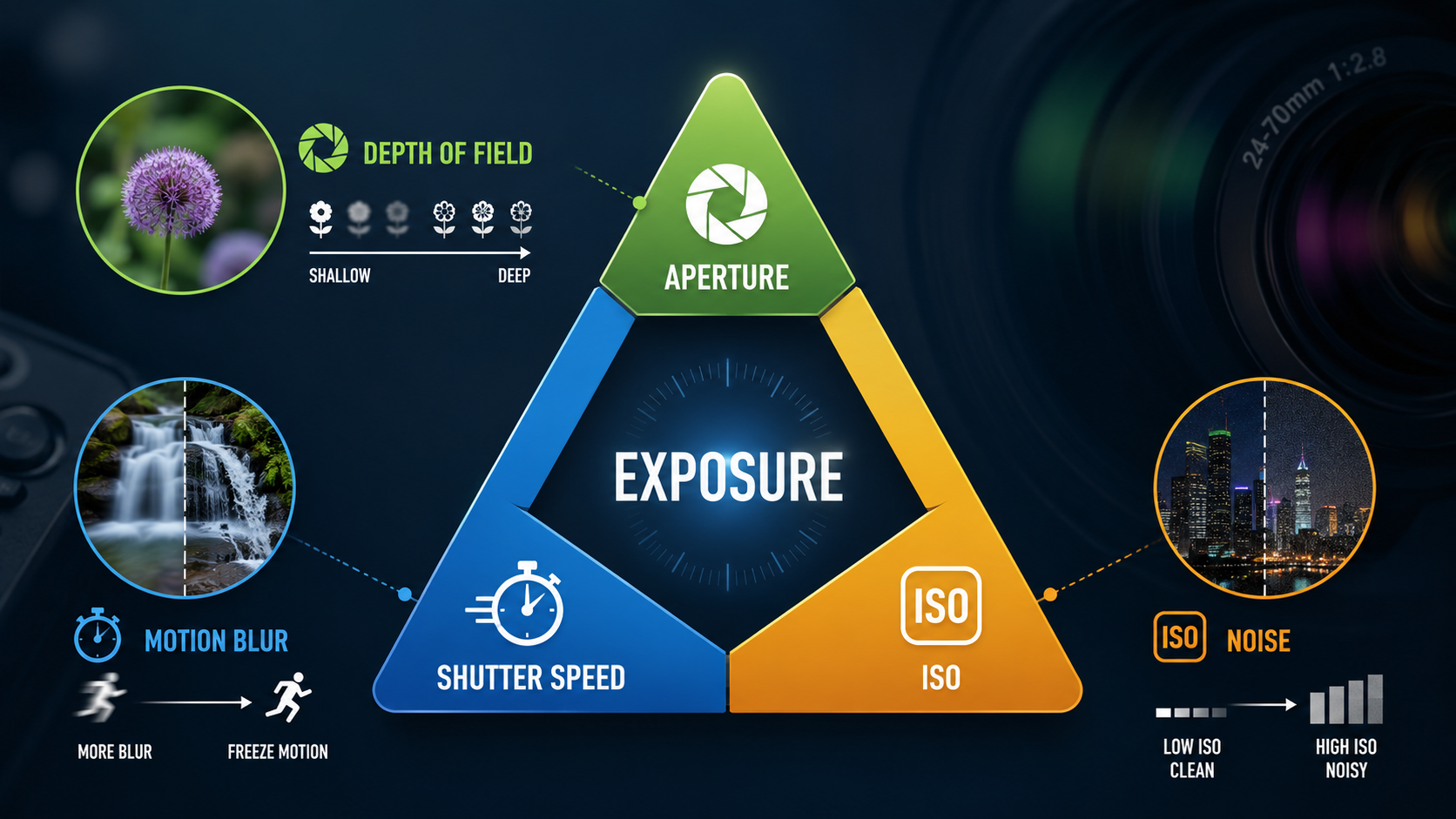
Aperture is the adjustable opening inside a camera lens that controls how much light passes through the lens to the camera sensor. It is one of the three main exposure settings, alongside shutter speed and ISO, and it also has a major creative effect on how much of your photograph appears sharp.
If you are new to photography, the numbers can seem backwards at first. A small f-number such as f/2.8 means a wide aperture, while a larger number such as f/11 means a smaller aperture. Once that relationship makes sense, aperture becomes one of the most useful camera settings to control.
What does aperture control?
Aperture affects three important things:
- Exposure - how much light reaches the sensor.
- Depth of field - how much of the scene appears acceptably sharp from front to back.
- Lens performance - very wide or very small apertures can affect sharpness because of lens aberrations and diffraction.
How aperture controls light
Photography is all about capturing light. To make a photograph we need to control how much light reaches the camera's photosensitive surface, whether that is film or a digital sensor.
A lens controls part of that light using a diaphragm made from overlapping blades. As those blades move, the opening becomes larger or smaller.

Open the diaphragm and more light can pass through. Close it and less light reaches the sensor. Your shutter speed and ISO then work alongside aperture to create the exposure you want.
What is an f-stop?
Aperture is normally displayed as an f-number or f-stop, such as f/1.8, f/2.8, f/4, f/5.6, f/8, f/11 or f/16.

The f-number is a ratio between the focal length of the lens and the diameter of the effective aperture. You do not need to calculate this while taking photographs, but understanding that it is a ratio helps explain why the numbering appears backwards.
For beginners, remember:
- f/2.8 - relatively wide opening.
- f/5.6 - medium opening.
- f/11 - relatively small opening.
Aperture and stops of light
Camera settings are often described in stops. Changing a setting by one full stop either doubles or halves the amount of light involved.
For example, moving from f/8 to f/5.6 opens the aperture by one full stop and allows approximately twice as much light through the lens. Moving from f/8 to f/11 closes it by one stop and lets through approximately half as much light.
This common language of stops is useful because aperture, shutter speed and ISO can compensate for one another. If you change one setting by a stop, you can often change another by a stop in the opposite direction to maintain a similar overall exposure.
Why are the f-stop numbers unusual?
Photography has some maths hiding behind it. The aperture opening is a two-dimensional area, so changing its diameter changes the area - and therefore the amount of light - by more than you might initially expect.

The area of a circle is calculated using π multiplied by the radius squared. You do not need to memorise the calculation to use aperture successfully. What matters in practical photography is understanding how each stop changes the light reaching the sensor.
Aperture and depth of field
Aperture is only one of the factors involved. Focal length, subject distance and background distance also affect how much of the photograph appears sharp. My Depth of Field guide explains how these work together and how to create stronger background blur.
Aperture does more than change exposure. It is also one of the factors that controls depth of field.
Depth of field describes the range of distances in a photograph that appear acceptably sharp.
A wider aperture, such as f/2.8, can help create a shallow depth of field where the subject is sharp and the background appears blurred. This is commonly used in portrait photography.

A smaller aperture, such as f/8 or f/11, will generally increase depth of field, which can be useful when you want more of a landscape to appear sharp.

Aperture is not the only thing that affects depth of field. Your focal length, distance from the subject, subject-to-background distance and sensor format all contribute too. That is why simply selecting the widest aperture available does not guarantee a very blurred background.
Should I always use a small aperture for sharp photos?
No. This is a common beginner mistake.
Closing the aperture can increase depth of field, but very small apertures can introduce diffraction. Diffraction causes fine detail to become softer as light bends around the edges of the small aperture opening.
At the other extreme, many lenses are also a little softer when used completely wide open because lens aberrations are more visible.
The aperture where a particular lens delivers very strong sharpness with manageable diffraction is sometimes called its sweet spot. For many lenses this falls somewhere in the middle of their aperture range, although there is no single aperture that is correct for every lens.
Practical aperture settings for beginners
These are useful starting points rather than strict rules:
- Portrait: try f/2.8 to f/4 if you want the subject separated from the background.
- Street or general photography: f/4 to f/8 can be a useful flexible range.
- Landscape: f/8 to f/11 is often a sensible starting point when you want greater depth of field.
- Low light: use a wider aperture when you need to let more light through the lens, while keeping an eye on depth of field.
The important thing is not to memorise a magic f-stop. Decide how much depth of field you want, then balance aperture with shutter speed and ISO to achieve the exposure and creative result you need.
How aperture, shutter speed and ISO work together
Aperture is only one part of exposure. The other two main camera controls are shutter speed and ISO.
Shutter speed controls how long the sensor is exposed to light and strongly affects how movement is recorded. ISO changes how the camera responds to the captured light and affects image noise and available exposure options.
Once you understand all three settings together, moving beyond Auto mode becomes much easier because you can make deliberate choices rather than allowing the camera to decide everything for you.
Aperture explained - the key points
- Aperture is the adjustable opening inside your lens.
- A wider aperture allows more light through.
- A smaller f-number means a wider aperture.
- Aperture is measured using f-numbers or f-stops.
- Each full stop doubles or halves the light.
- Wider apertures can create shallower depth of field.
- Smaller apertures generally increase depth of field.
- Very small apertures can reduce sharpness through diffraction.
- Aperture works alongside shutter speed and ISO to control exposure.
Want to get out of Auto mode?
My beginner photography courses teach aperture, shutter speed, ISO, focusing and the essential camera controls step by step. You can learn online at your own pace or choose practical one-to-one photography tuition around Portsmouth.
Explore beginner photography coursesContinue the Exposure Series

Andy Hornby
Photographer, educator and workshop leader with more than twenty-five years of practical photography experience.
Learn with Andy