Camera modes decide how much control you give to the camera and how much you keep for yourself. The most important modes for beginner photographers are Auto, Program, Aperture Priority, Shutter Priority and Manual.
You do not need to use Manual mode all the time to be a photographer. The best mode is the one that gives you the right level of control for the photograph you are trying to make.

What do camera modes actually control?
The main exposure modes control who chooses your aperture and shutter speed: you, the camera, or a mixture of both.
ISO may be selected manually or automatically depending on your camera and settings.
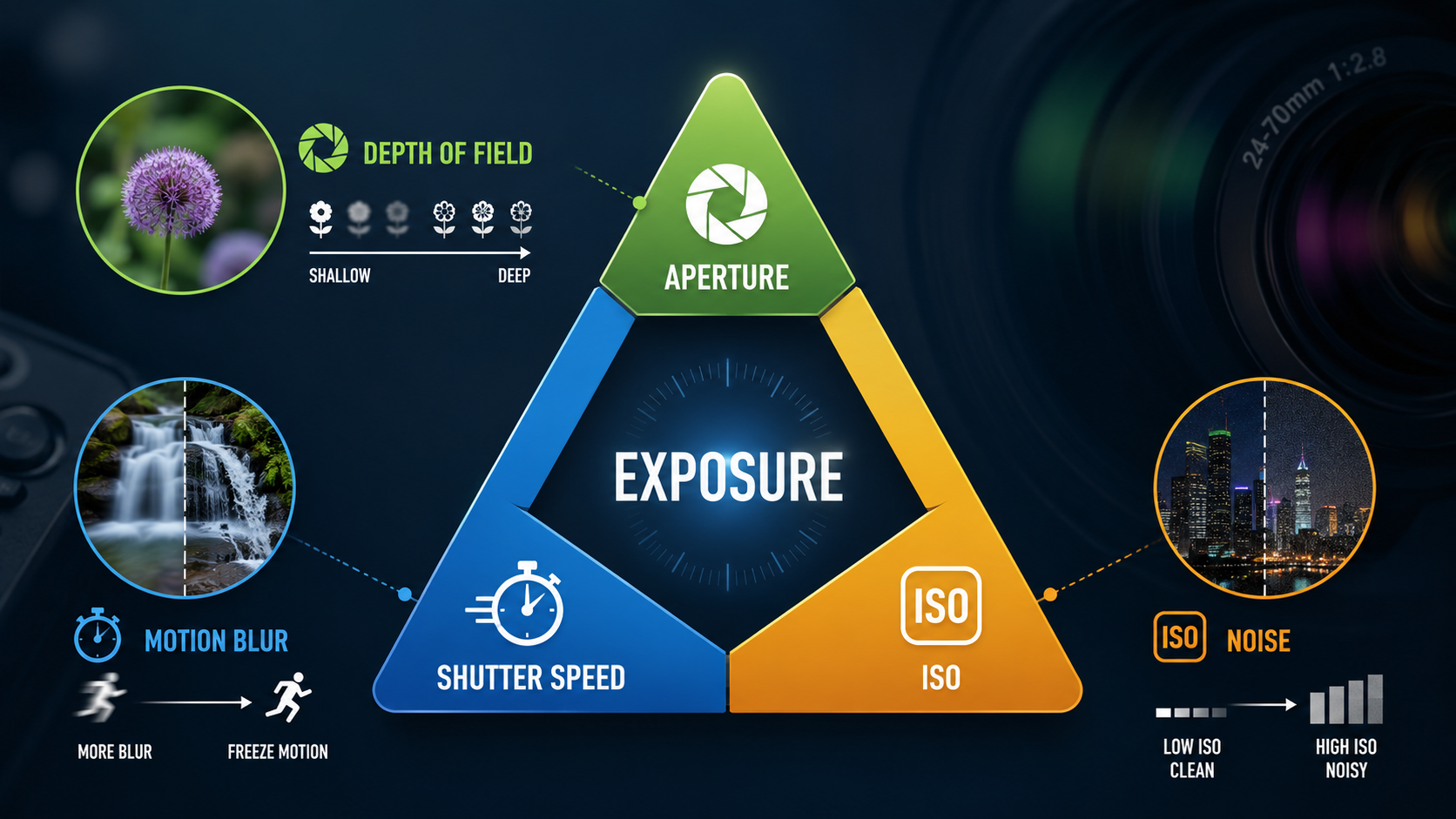
These modes make much more sense once you understand the exposure triangle , because they are really different ways of managing aperture, shutter speed and ISO.
Auto mode
In full Auto mode, the camera makes most of the decisions for you. It will normally choose shutter speed, aperture and ISO, and may also control flash, focusing behaviour and other settings.
Auto mode is useful when getting the photograph quickly matters more than controlling exactly how it looks.
The downside is that the camera does not know your creative intent. It cannot know whether you want a blurred background, frozen action or intentional motion blur.
Program mode (P)
Program mode sits between full Auto and the more creative exposure modes.
The camera normally chooses both aperture and shutter speed, while you retain more control over settings such as ISO, exposure compensation, white balance and flash.
Many cameras offer Program Shift, allowing you to rotate a control dial and choose a different aperture/shutter-speed combination while keeping a similar overall exposure.
Aperture Priority mode (A or Av)
In Aperture Priority, you choose the aperture and the camera chooses the shutter speed required for the exposure.
Nikon, Sony, Fujifilm and several other manufacturers commonly use A. Canon commonly uses Av.
Aperture Priority is one of the most useful modes for learning photography because it lets you directly control depth of field.
It works particularly well for:
- portraits;
- landscapes;
- street photography;
- travel photography;
- close-ups;
- situations where the light changes but your preferred aperture stays important.
Learn more in my beginner guide to aperture .
Shutter Priority mode (S or Tv)
In Shutter Priority, you choose the shutter speed and the camera chooses the aperture.
Many cameras use S, while Canon commonly uses Tv, meaning Time Value.
Shutter Priority is useful when the way movement appears in the photograph matters more than depth of field.
It works particularly well for:
- sport;
- wildlife;
- children and pets;
- vehicles;
- panning;
- intentional motion blur;
- moving water.
Learn more in my beginner guide to shutter speed .
Manual mode (M)
Manual mode gives you direct control of both aperture and shutter speed.
You may also choose ISO manually, or use Auto ISO while keeping aperture and shutter speed fixed if your camera supports it.
Manual mode is particularly useful when you want your exposure settings to remain consistent even if the brightness or colour of the scene changes.
Useful examples include:
- studio photography;
- flash photography;
- night photography;
- long exposures;
- panoramas;
- consistent event lighting;
- situations where the camera's meter is being confused by the scene.
Does using Manual mode make you a better photographer?
No.
Manual mode gives you control, but using it when another mode would be quicker and more effective does not automatically improve the photograph.
Experienced photographers often switch between Manual, Aperture Priority and other modes depending on the situation.
Understanding why you are choosing a particular mode is far more important than trying to use Manual simply because it sounds more professional.
Manual mode with Auto ISO
Manual mode with Auto ISO can be extremely useful.
You choose the aperture and shutter speed because those settings control the creative result, then allow the camera to adjust ISO as the available light changes.
For example, when photographing people at an event you might choose an aperture for the depth of field you want and a shutter speed fast enough to freeze movement, while Auto ISO responds as you move between brighter and darker areas.
My beginner guide to ISO explains when increasing ISO is useful and what happens to image quality.
Aperture Priority vs Shutter Priority
The choice is easier if you ask one question: what matters most in this photograph?
| Situation | Good starting mode | Reason |
|---|---|---|
| Portrait | Aperture Priority | Depth of field is often the main creative choice |
| Landscape | Aperture Priority or Manual | Depth of field and consistent exposure may matter |
| Sport | Shutter Priority or Manual | Freezing movement is usually important |
| Wildlife | Shutter Priority or Manual with Auto ISO | Subject movement often determines shutter speed |
| Night photography | Manual | Consistent control is usually more useful |
What camera mode should beginners use?
If you are trying to move away from full Auto mode, I usually recommend learning Aperture Priority first.
It gives you one important creative decision to make - the aperture - while the camera handles shutter speed.
Then learn Shutter Priority so you understand how to control movement.
Once aperture, shutter speed and ISO make sense individually, Manual mode becomes much easier because you understand what each setting is doing instead of simply turning dials until the meter reaches zero.
Mode limits to watch
Semi-automatic modes still have physical limits.
Aperture Priority can run out of shutter speed
Imagine using f/1.4 in bright sunshine. The camera may reach its fastest available shutter speed and still be unable to reduce the exposure enough.
You may need to reduce ISO, use a smaller aperture or add an ND filter.
Shutter Priority can run out of aperture
Imagine choosing 1/1000 sec indoors. The camera may open the lens as wide as possible and still be unable to achieve the desired exposure.
You may need to raise ISO, slow the shutter speed or add more light.
Bulb mode
Bulb mode is designed for exposures longer than the normal timed shutter-speed range of the camera.
It is commonly used for:
- long exposures;
- star trails;
- light painting;
- very dark night scenes;
- creative movement effects.
Scene modes
Many beginner-oriented cameras include scene modes such as Portrait, Landscape, Sport, Macro and Night Portrait.
These modes automate several settings at once and try to make decisions appropriate for that type of photograph.
They can be useful while learning, but they give you less control than Aperture Priority, Shutter Priority or Manual.
Camera modes and the exposure triangle
Camera modes are really just different ways of controlling the settings in the exposure triangle .
- Aperture Priority: you control aperture; the camera responds with shutter speed.
- Shutter Priority: you control shutter speed; the camera responds with aperture.
- Manual: you control both aperture and shutter speed.
- ISO: may be controlled by you or by Auto ISO.
Once you understand that relationship, the letters on your mode dial become much less intimidating.
Camera modes explained - key points
- Auto lets the camera make most exposure decisions.
- Program gives you more control while still automating exposure.
- Aperture Priority is ideal when depth of field matters.
- Shutter Priority is ideal when movement matters.
- Manual gives direct control of aperture and shutter speed.
- Manual mode is not automatically more professional.
- Auto ISO can work very well with Manual mode.
- Understanding the exposure triangle makes all camera modes easier to use.
Want to get off Auto mode with confidence?
My beginner photography courses teach aperture, shutter speed, ISO, focusing, exposure modes and essential camera controls step by step. You can learn online or through practical one-to-one tuition around Portsmouth.
Explore beginner photography coursesContinue learning camera exposure

Andy Hornby
Photographer, educator and workshop leader with more than twenty-five years of practical photography experience.
Learn with Andy